
Built by drainage engineers for drainage engineers
We wrote it for ourselves. It codes the recording to MSCC5, grades the pipes, draws the site and prints the report, all on the laptop in the van. Other contractors can now use it.
Request access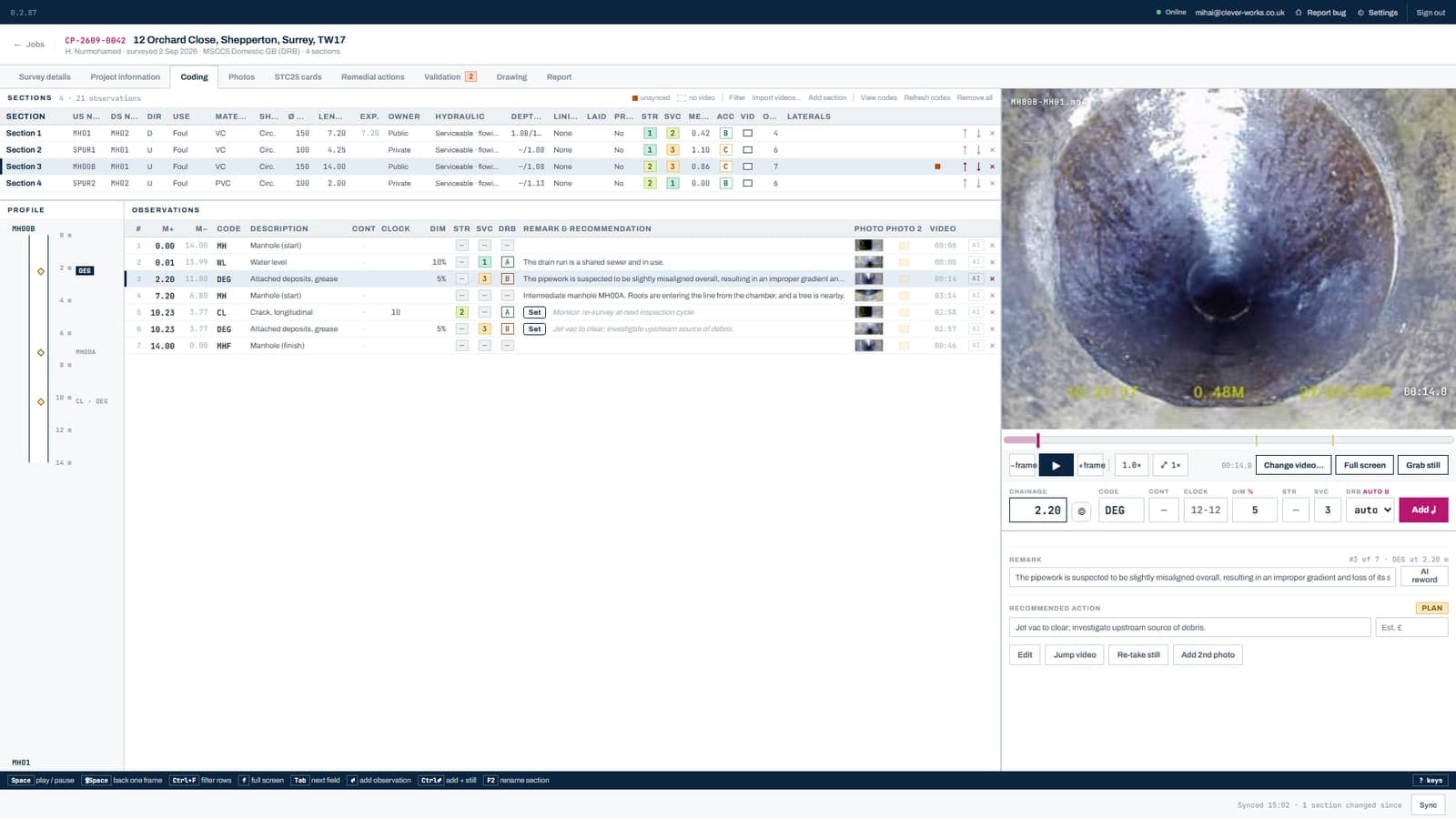
Camera software
Our own capture software for the crawler and push-rod cameras. Coming soon.
Tell me when it is readyClever Works Field
The phone app our surveyors use on site: chamber cards, BRE365 timers, RAMS, photos. Coming soon.
Tell me when it is readyCleverWorksCAM
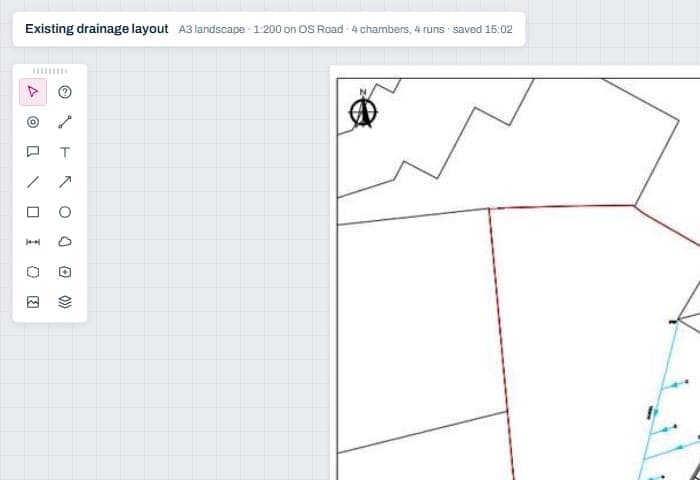
Import the recordings, code each observation with the MSCC5 catalogue in front of you, grade the pipes, draw the site and print the report. It works without a signal and syncs to the office when there is one. Your name and logo go on every page.
It codes to WRc MSCC5 and BS EN 13508-2. The WRc Approved assessment is in progress; we will say here when it is granted.
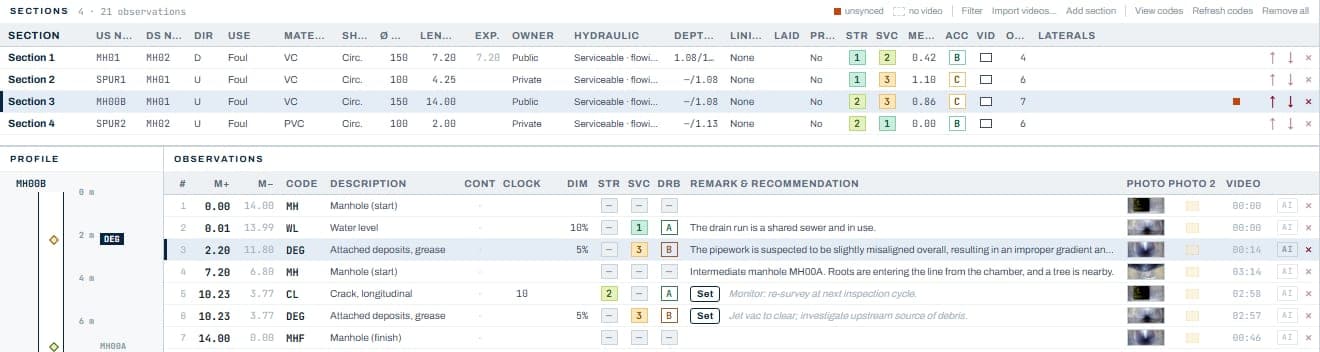
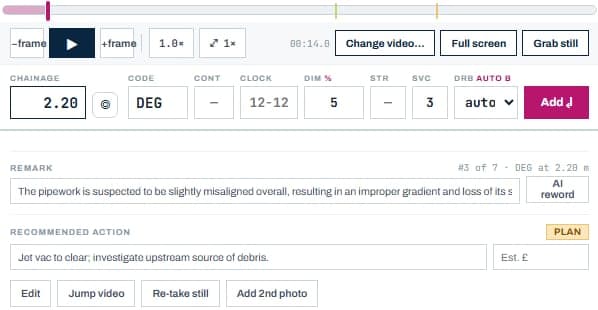
Type the chainage and the code, fill in what the code needs, press Enter. It takes the frame the video is on as the still. A code from the wrong card is refused, so a section is never coded in two systems.
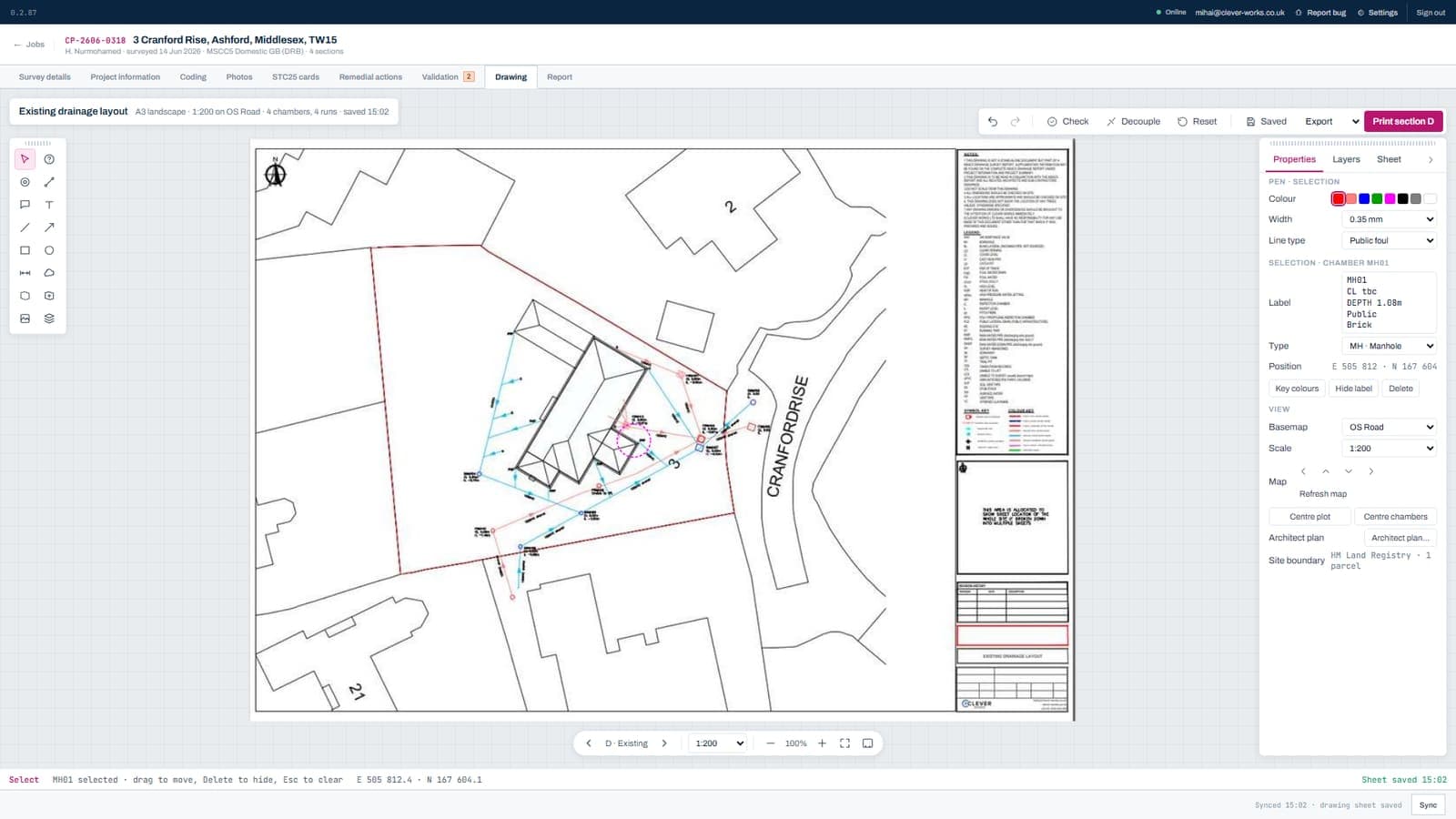
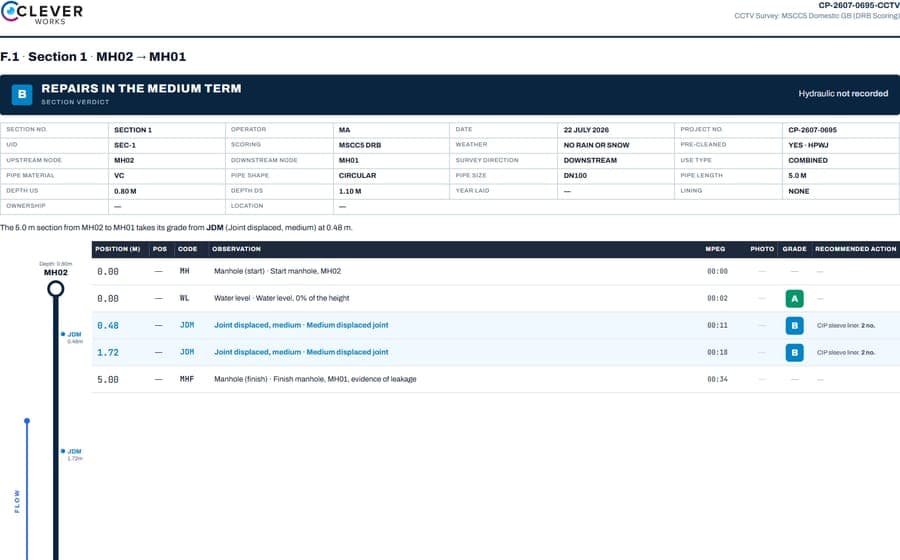
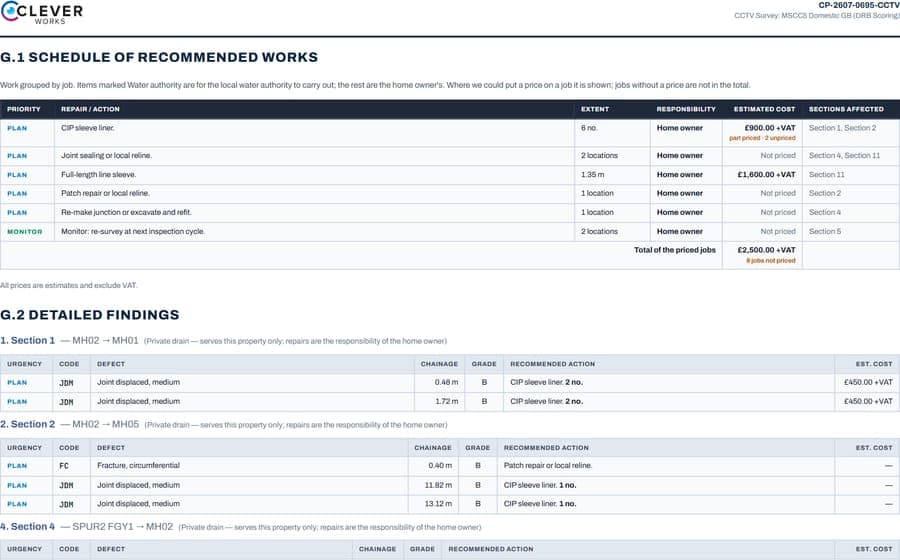
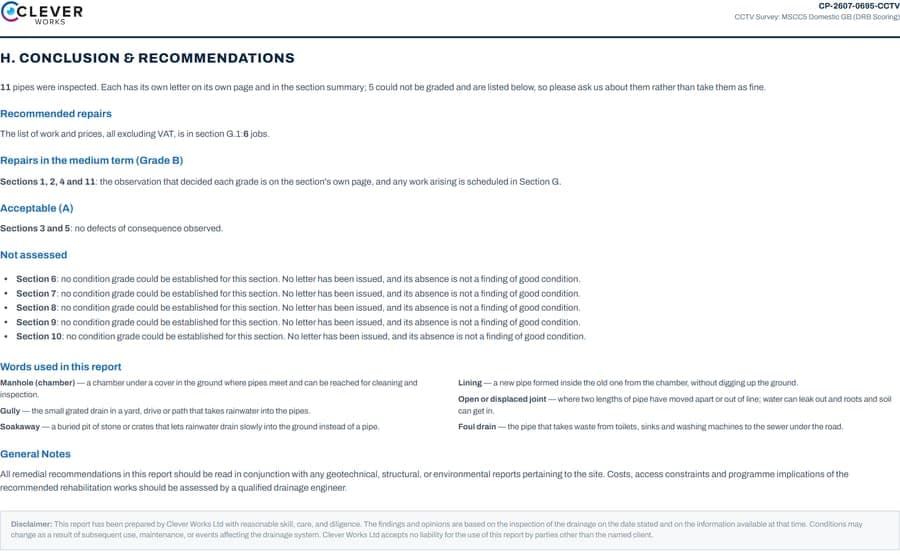
- Runs on
- Windows 10 or 11
- Recordings
- MP4 from the crawler or push-rod
- Connection
- Not needed to survey
- Version
- 0.2.89
Request access
We quote per surveyor after a call about how you work, then set up an account for each surveyor and send the installer link. There is no checkout.
Or ring us: 01252 917235
Licence agreement
Version 1.0, from 6 September 2026. One licence per surveyor. Your surveys stay yours. Written so you can read it before the call.
Read the agreement
Clever Works Ltd, company number 13947390, registered in England and Wales at 128 City Road, London, EC1V 2NX.
1. Who this agreement is between
This agreement is between Clever Works Ltd ("we", "us"), the company that develops and licenses the software, and the business named on the licence ("you"). It covers CleverWorksCAM and, when they are released, the camera software and the Clever Works Field mobile app (together, "the software").
By installing or using the software you accept this agreement on behalf of your business. If you do not accept it, do not install the software.
2. What the licence lets you do
A licence is per named surveyor. Each surveyor gets their own account and may install the software on the computers they use for your business. The licence lets that surveyor use the software to survey, code, grade, draw and report for your business and its clients.
A licence runs for the term stated on your invoice and renews only when you renew it. There is no automatic charge.
You may not:
- share one account between people, or let anyone outside your business use it;
- copy, sell, rent, sublicense or lend the software, or offer it as a service to others;
- reverse engineer, decompile or disassemble it, except to the extent the law allows;
- remove or hide our notices, or present the software as your own;
- use it to build a competing product or to extract the code catalogue.
3. Whose data is whose
Your surveys are yours. The recordings, stills, observations, drawings and reports you create belong to you and your clients. They live on your laptop and in your office account. We do not use them to train anything, and we do not look at them unless you ask us to for support.
The software itself, the code catalogue, the report layout and the drawing engine belong to us or to our licensors. The MSCC5 code descriptions are reproduced from the Water Research Centre's Manual of Sewer Condition Classification under its terms.
When a licence ends, your surveys stay on your laptop and remain yours. Synced copies in your office account are available for export for ninety days after the end date, after which we may delete them.
Our privacy policy at clever-works.co.uk/privacy explains what we hold about you as a customer.
4. Offline use, syncing and the office account
The software works without a connection. A connection is used to sign in by emailed code, to sync surveys to your office account, to fetch the Ordnance Survey base for the drawing, and to update the software and its catalogue.
Ordnance Survey mapping and HM Land Registry boundary data reach you through our services and remain subject to those bodies' terms. They are for use within your reports and drawings, not for resale as mapping.
5. AI features
Some features use an AI model to draft text or propose observations: the reword of a remark, the draft coding of a run, the analysis of stills. Every one of them is a switch on your licence, off unless you ask for it, and each shows what it did and did not look at.
AI output is a draft for a qualified surveyor to accept, edit or refuse. It never sets a grade. You remain responsible for every observation, grade and recommendation in a report that carries your name.
When an AI feature is on, the stills or text it works on are sent to the model provider for the duration of the request and are not kept by them. Usage is metered per account and shown to us; we may cap it or charge for it if it is far outside what was agreed.
6. Standards and the WRc assessment
The software codes to the WRc Manual of Sewer Condition Classification, 5th edition, and to BS EN 13508-2. The domestic grading follows the Drain Repair Book, 4th edition. The software checks each observation against what the standard requires and blocks a report while something is missing.
The software is not WRc Approved. An assessment is in progress; we will say so on the software page on the day a certificate is granted and not before. Until then, do not describe reports produced with the software as WRc Approved.
7. Updates and support
Updates are released as we make them and are included in the licence. Each update carries release notes saying what changed and what was tested. You choose when to install one; a survey started on an earlier version opens in the later one.
Support is by phone and email during office hours. We will help with installing, signing in, syncing and using the software, and we will fix defects in the software. Training, custom report layouts and work on your own surveys are quoted separately.
8. Fees
Fees are quoted per surveyor, in writing, before a licence starts, and are payable in advance for the term. Prices are not published on the website because every contractor is set up individually. VAT is added at the rate in force.
If a payment is overdue by more than thirty days we may suspend sign-in until it is settled. Your surveys stay on your laptop throughout.
9. How a licence ends
A licence ends at the end of its term unless renewed. Either party may end it early in writing if the other breaks this agreement and does not put it right within thirty days of being told.
We may end a licence at once if the software is shared outside your business, copied or reverse engineered.
When a licence ends, sign-in stops, the software stops accepting new surveys, and section 3 applies to your data.
10. What we are responsible for
We will provide the software with reasonable skill and care. The survey, the coding, the grades and the recommendations in a report are yours: a report produced with the software is your professional work, under your name, and you are responsible for it and for its use.
We do not exclude liability for death or personal injury caused by our negligence, for fraud, or for anything else the law does not let us exclude. Apart from that, our total liability under this agreement in any year is limited to the licence fees you paid us for that year, and we are not liable for loss of profit, loss of business or indirect loss.
The software is provided as described on the software page. We do not promise it is free of every defect; we do promise to fix defects that stop it doing what that page says.
11. General
We may update this agreement for new versions of the software. The version in force when your licence starts or renews is the one that applies to that term; each account records it.
This agreement is governed by the law of England and Wales, and the courts of England and Wales have exclusive jurisdiction.
If any part of this agreement is found unenforceable, the rest still applies. Neither party may transfer this agreement without the other's written consent, except that we may transfer it to a successor to our business.
Updates and support
Updates are included. Each one comes by email with a note of what changed, and you install it when you like. The user guide opens from Settings inside the software.